Invoice capture and purchase approvals
AI reads each invoice, matches it to the order and goods receipt and checks the budget, then the right person approves it from the list, Outlook or a phone.
Example project
Based on a project our team built. Client details are left out or changed, and the demo uses invented data.
- Sector
- Consumer goods manufacturing
- Typical duration
- 10 to 14 weeks
Typical client situation
A consumer goods manufacturer that approves supplier invoices in several stages and runs a purchase request desk for equipment, services and travel. Approvers are spread across plants and are often away from their desks or out of office.
Challenge
Invoices and requests travel by email and paper. Data is retyped from PDFs, nobody can see at a glance who holds an item, how long it has waited, or whether the invoice matches what was ordered and received.
Approvers see every action on every item, or none, rejecting without a comment leaves the next person guessing, and items stall when an approver is out of office. Month-end brings a rush of overdue invoices.
Solution
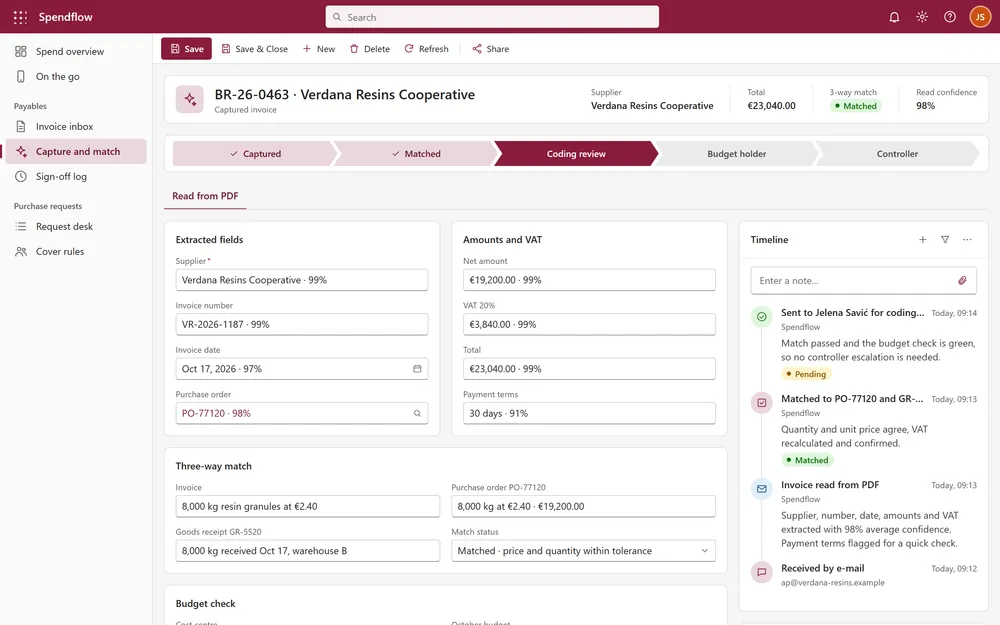
The solution reads each supplier invoice with AI: supplier, number, dates, amounts and VAT are extracted with a confidence score, and the cost centre is suggested. It then runs a three-way match against the purchase order and the goods receipt and shows the match status, including price and quantity variances. The approval layer sits on SharePoint lists and libraries, where SPFx ListView command sets show Approve, Reject (comment required), Return, Take over and Download only to the current approver, and only at the right status.
Before an invoice or request reaches an approver, a budget check compares it with the remaining budget of its cost centre and adds a controller step only when the budget would be exceeded. Power Automate routes the multi-stage approvals and reads out-of-office entries from Outlook calendars to delegate automatically and return the item afterwards.
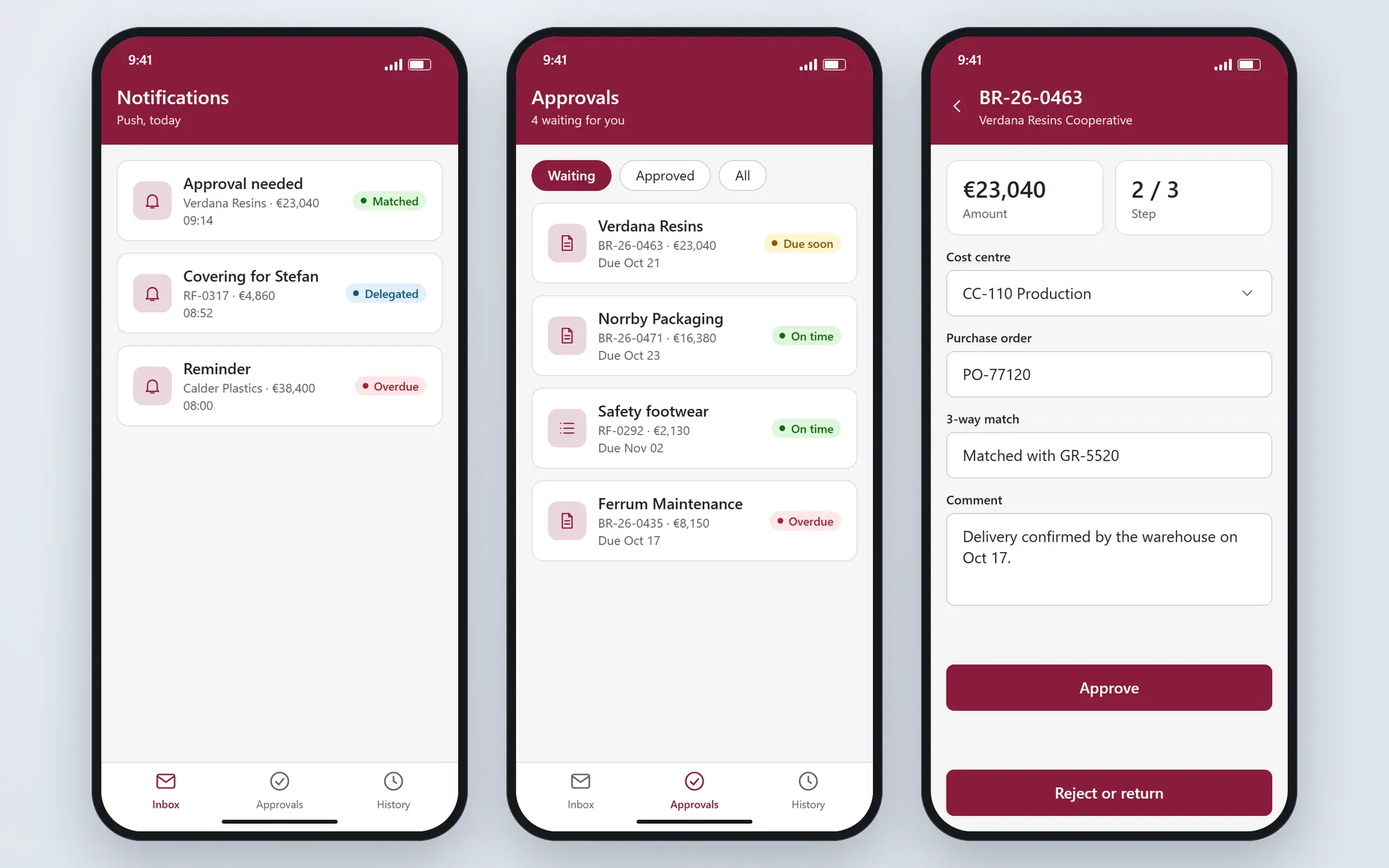
A model-driven app in Dataverse gives the request desk a form with attachments and a business process flow. Approvers decide from an Outlook email card built with Adaptive Cards, or from push notifications and a mobile view, and every decision lands in the same history. An HTML dashboard and PCF grid customizers show status icons and red, yellow and green due dates.
AI invoice capture with supplier, amounts, VAT and a confidence score
Three-way match against purchase order and goods receipt, with match status
Budget check against the cost centre before approval
Automatic delegation from out-of-office calendars
Push notifications and mobile approval, or approve from an Outlook email card
Actions shown only to the current approver at the right status
Plan of the solution
Stack
- SPFx
- SharePoint Online
- Power Automate
- Dataverse
- PCF
- Adaptive Cards
- TypeScript
Screens from the demo
We rebuilt this solution as a demo with invented data, so you can see how it works without exposing any client system. Click through it yourself.
Open the interactive demo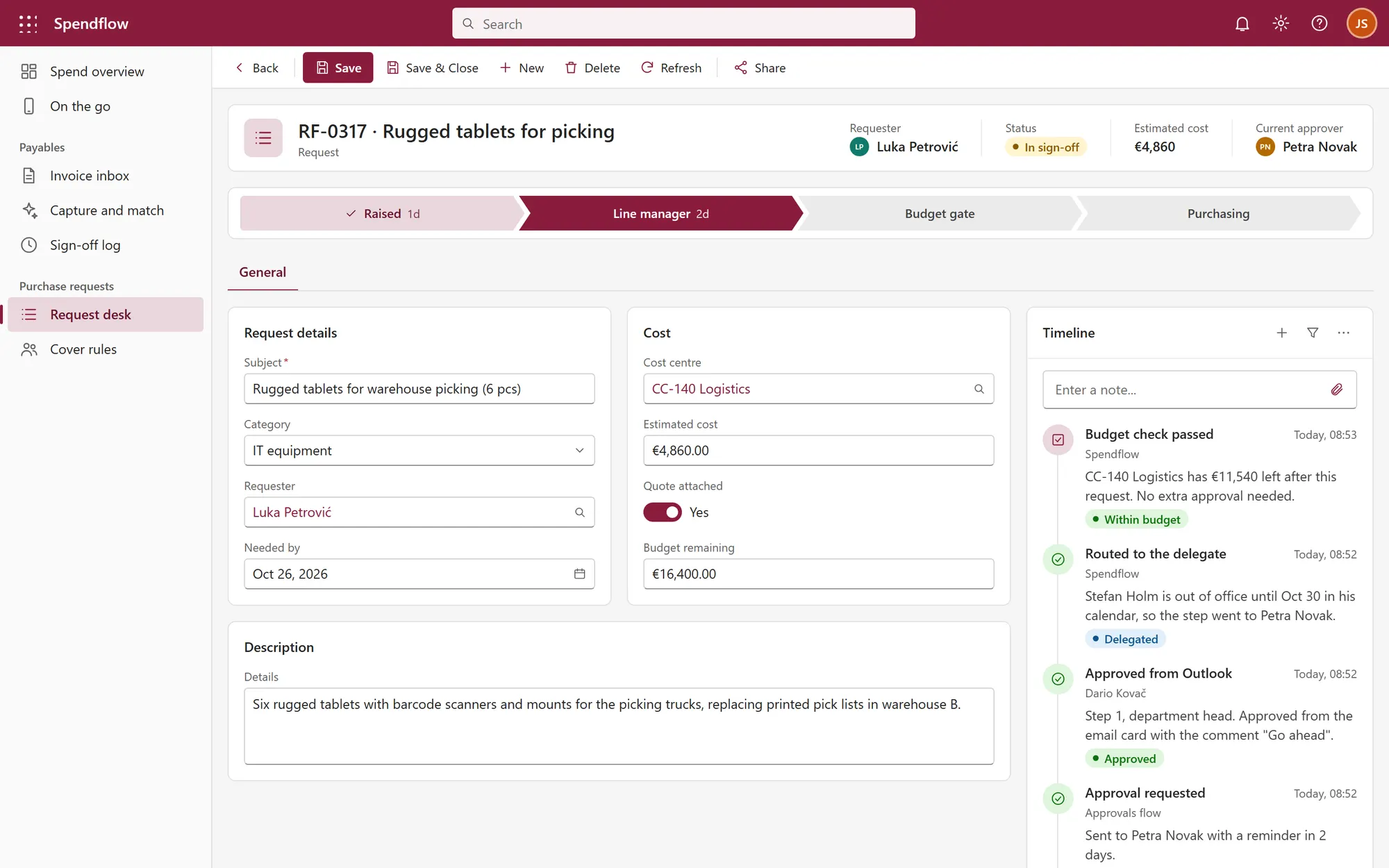
What it is built to deliver
- Invoices are read and checked against the order and receipt before an approver sees them
- Matched on arrival
- Each item is compared with the cost centre budget before it is approved
- Budget checked
- Decisions made from the list, the phone or the inbox, with cover when someone is away
- Approve anywhere
Recognize the situation?
Tell us where your process is stuck. We will tell you honestly whether we can help.